Prioritize Eligible Courses
Prioritize eligible courses allows you to change the processing order of courses. In general, the audit will put the first taken course into the first available requirement (and any allowed double counts; it processes from the top down). If a course is used in an audit requirement that could also be used in a requirement lower on the audit, you could prioritize the eligible course to count where you would like. For example, the Race, Ethnicity, and Gender Diversity requirement is the first of the GE Foundations to accept courses, but many of those courses could also count in another GE. If a course is counting in GE REGD that a student would prefer to count in Historical and Cultural Studies, you can move it using Prioritize Eligible Courses. This does not allow the course to violate any other constraints (it will not go into a place it would not normally count and it does not override any other limits, such as minimum grade or transfer credit, etc.).
RELSTDS 2370 can be used as a Race, Ethnicity, and Gender Diversity or Historical and Cultural Studies GE. It goes first to REGD because that is the first listed Foundation.

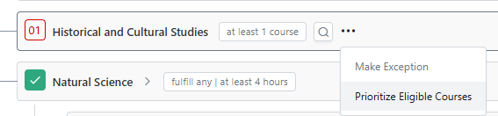
Find the requirement you want to move the course into. Click on the three dots on that requirement and select Prioritize Eligible Courses.
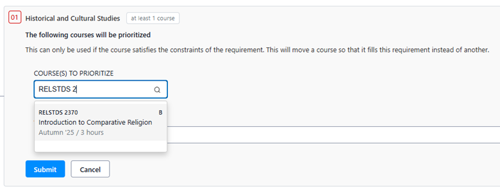
Enter the course you would like to move into the HCS requirement. A justification is also required. Click submit.
This moves the course into the HCS requirement and now the REGD requirement is incomplete. To see the details of this (such as who posted it and when), click on the green box.