
Degree Audit Exceptions - General Tips and Notes
With exceptions access, you should only be entering exceptions that you are authorized to enter. Please do not post exceptions to any requirements outside of your area without express permission from someone authorized to ask for these exceptions.
- Exceptions are easier to post in BDP – they are posted directly from the audit rather than switching pages. They are also easier to see in BDP – can see who posted an exception, when, and why. Additionally, you no longer need to worry about course masks (no counting spaces) or pseudos!
- BDP allows exceptions to be placed for any course that falls into the audit (planned, in progress, and completed). It is our university practice to only make exceptions for in progress and completed courses.
- Many exceptions to requirements can be or will be maintained when a student changes from one college to another.
- When posting some types of exceptions, there are Advanced options available.
- These Advanced options will you allow you to apply the exception to requirements that may be used in other audits (especially in cases where you are posting an exception to a pre-major audit before a student is admitted to the full major). This will also allow you to add a course to a requirement and override other constraints (such as minimum grades), so please ensure you are making appropriate selections.
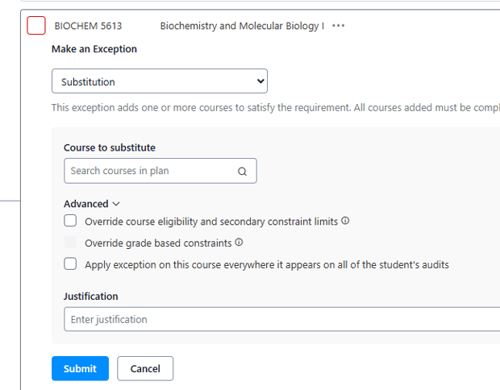
- These Advanced options will you allow you to apply the exception to requirements that may be used in other audits (especially in cases where you are posting an exception to a pre-major audit before a student is admitted to the full major). This will also allow you to add a course to a requirement and override other constraints (such as minimum grades), so please ensure you are making appropriate selections.
- When posting some types of exceptions, there are Advanced options available.
- Be as specific as possible when selecting where to post exceptions – look at what the constraints are and consider what you are trying to do with an exception.
- A justification must be entered for all exceptions. These are viewable by students and staff with access to the system. The exception will also list your name and the date and time it was posted. It will become part of the history record on the student’s audit as well.
- Avoid Manually Pick Courses in almost every situation.
Students who exceptions for AA/AS/OT36 (or higher):
- In most cases, staff making exceptions should insert the most appropriate transfer course into each foundation category. If there is truly no course that can be used, the requirement can be waived. Notes should include “Based on completion of ___ (insert credential)”.
- BDP will place transfer courses in the choice theme automatically for OT36 students. Functionality to do this for AA and AS students is forthcoming. **as of February 2026, this is not working for students getting the OT36 added to their record moving forward – we are working on a fix for this with the vendor.
- Exceptions will need to be made for the REGD category to be fulfilled (and any other foundations area).
Transfer Credit:
- BDP takes in transfer credit based on the term the credit is transferred in (course details will list out term and institution taken), and courses flow into the audit based on the GEN (or other degree component) status at the time the courses transfer in. This means that:
- Courses will fall into the audit based on the term they transfer rather than term completed.
- When a course falls into the audit based on this, it is our practice to leave the course where it has applied: once a course falls in as counting for a specific requirement, we do not remove it.
- If a course no longer has GEN status (example ENGLISH 2367.02 which had status AU22-SU24 and lost LVPA status starting AU24, or SOCIOL 1101 which only applied to REGD for AU23), but was taken in a term when it did, we will make every reasonable effort to apply it by exception and indicate that it was approved during term taken (include justification: ENGLISH 2367.02 was taken SP23 when approved for LVPA).