
Count this Course
BDP views an in progress course as graded lower than a completed passed course, regardless of the grade. If a student got a grade too low to count toward a degree requirement and is repeating it, you may need to use Count This Course to move the in progress instance into the requirement. This does not allow the course to violate any other constraints (it will not go into a place it would not normally count and it does not override any other limits, such as minimum grade or transfer credit, etc.).
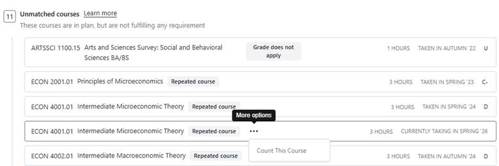
To use this functionality, find the course in the unmatched courses list and click on the three dots. Select Count This Course.
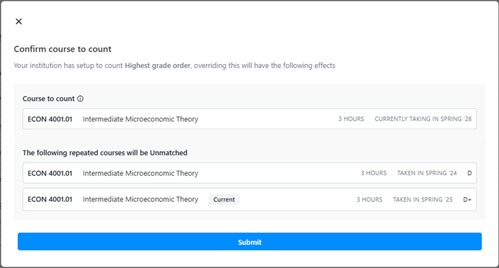
A menu will pop up to prompt you to confirm the change you are making. Click submit. You can confirm that the in progress course is now being used where you except and the other instances are no longer counting (should be in unmatched).
The course will then show in the expected requirement with a note that a custom counting preference was used. To see the details of this (such as who posted it and when), click on the blue box.
