
Limbo Courses
“The University Registrar will monitor the frequency of course offerings, identify those that have not been offered for three consecutive years, and inform the dean of the appropriate college. The dean and the chair or director of the relevant instructional unit will decide whether to remove that course from the course bulletin prior to the next academic year.”
(Faculty Rule 3335-8-16)
The current business process to execute the above Faculty Rule is outlined below:
Every summer, the Office of the University Registrar will report to the Office of Academic Affairs (OAA) courses that have not been successfully offered for 3 years/9 terms. ‘Successful offering’ is defined as student enrollment in a course that is greater than zero for a given term. That list of courses is distributed by OAA to the academic unit offering the courses. The academic unit reviews the list to determine which courses should be retained (with justification), placed into limbo status, or withdrawn from the course catalog. Courses remaining in limbo for 5 years will be officially withdrawn from the catalog.
The courses in the following report are currently in limbo status. These courses cannot be scheduled for student enrollment, nor will they appear in the course catalog. If your academic unit needs to offer any course in limbo status, please contact your Curricular Representative. Please reach out to the CIM Courses Administrative Team via email at sae-cim-courses@osu.edu if you need additional information.
Accessing the Report
To view the following report, you need access to OSU’s CourseLeaf CIM Courses.
If you already have access to CIM Courses, the link may prompt you to log in with your OSU credentials.
If you attempt to log in to CIM Courses to view the report at the link and receive an “unauthorized” error message, please email sae-cim-courses@osu.edu to coordinate access to CIM Courses.
Link to the Limbo Courses report in CIM Courses:
https://osu-next.osu.edu/admin/reports/limbo-courses/
How to Run the Report
Once on the report’s landing page, under Filters, next to “Inactivation Type”, select “Place in Limbo” from the dropdown menu.
Click the “Apply Filter(s)” button to see all subjects.
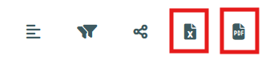
Note: The report can only display 1000 rows, therefore some data will be omitted from the report on the website. However, you can export to an excel spreadsheet or PDF to see all rows of data by selecting the excel or PDF icon in the upper right corner of the screen.
To filter by subject within the report on the webpage, next to “Subject” select the “Clear Filter” drop down menu and select the applicable subject you wish to view.
If you have any questions or need more information regarding the Limbo Courses report, please contact sae-cim-courses@osu.edu.
Last Updated September 21, 2026